Layout Quantity Breaks dla WooCommerce
Co to jest
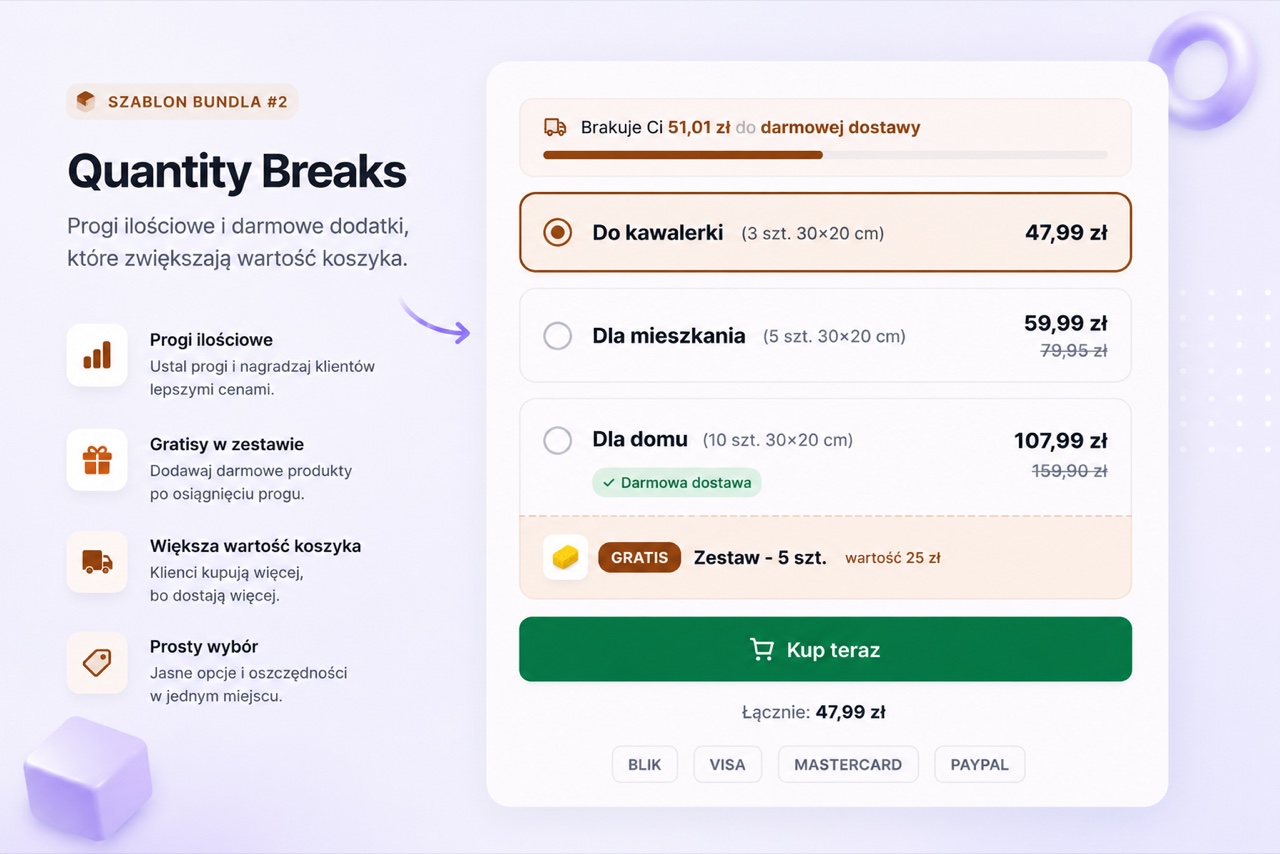
Quantity Breaks renderuje zwarta tabele cennika na stronie produktu. Kazdy wiersz pokazuje zakres ilosci i cene za jednostke lub rabat na tym poziomie. W przeciwienstwie do Quantity Tiers, ten layout jest zaprojektowany dla produktow, ktore klienci kupuja w wiekszych ilosciach - dziesiatki lub setki. Obsluguje tez gratisy per tier, co czyni go podstawowym layoutem dla promocji typu "kup 10, dostaniesz darmowa probke".
Kiedy go uzyc
Uzyj Quantity Breaks dla produktow konsumpcyjnych, zorientowanych na hurt lub takich, gdzie glownym argumentem sprzedazowym sa ceny wolumenowe. To rowniez wlasciwy layout, gdy chcesz wlaczyc gratis przy progu wydatkow. Dla mniejszej liczby wizualnie wyraznych tierow lepiej pasuje Quantity Tiers.
Jak skonfigurowac
- Stworz bundle Quantity Breaks
Stworz nowy bundle w BizBundles, wybierz layout Quantity Breaks i przypnij go do produktu.
- Ustaw przelomy i opcjonalne gratisy
Dodaj wiersze z progami ilosciowymi i cenami lub rabatami. Dla uzytkownikow Pro: przypnij produkt gratis do dowolnego tieru - to realny produkt WooCommerce dodawany za cene 0 zl gdy prog zostanie osiagniety.
- Opublikuj
Tabela renderuje sie na stronie produktu. Klient wpisuje ilosc i dodaje do koszyka. Rabat i ewentualny gratis sa obsluzone przez natywny koszyk WooCommerce.
Najczestsze pytania
Jaka jest maksymalna liczba tierow w Quantity Breaks?
Mozesz dodac do 7 tierow. Format tabeli obsluguje wiecej wierszy wygodniej niz kartowy layout Quantity Tiers.
Czy funckja gratisow wymaga Pro?
Tak. Gratisy per tier to funkcja Pro. Reszta layoutu Quantity Breaks - tabela cennikowa i natywny koszyk - jest dostepna w planie Free dla jednego bundla.
Czy moge pokazac opcje subskrypcji w Quantity Breaks?
Funkcja subskrypcji jest w roadmapie, ale jeszcze niedostepna. Aktualnie Quantity Breaks obsluguje jednorazowe tiery zakupu z opcjonalnymi gratisami.