Uruchom promocje BOGO na stronach produktow WooCommerce
Problem
Promocje BOGO (kup jeden, dostaniesz drugi gratis) sa jednym z najwyzej konwertujacych typow promocji w handlu detalicznym - ale WooCommerce nie ma wbudowanego widgetu BOGO. Typowym obejsciem jest kupon plus notatka na stronie produktu, ktora latwo przeoczyc i trudno sledzic.
Jak bundle to rozwiazuje
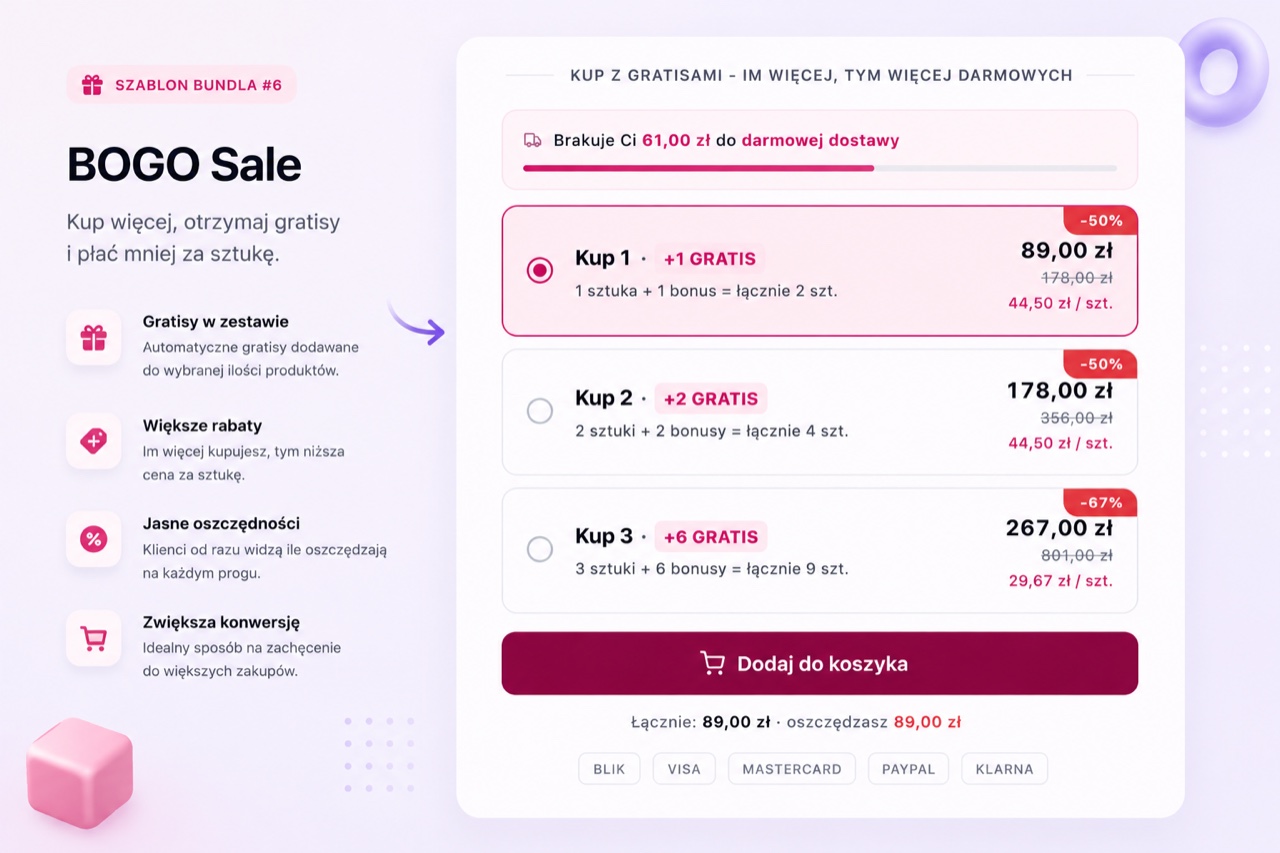
BizBundles dodaje layout BOGO bezposrednio do strony produktu. Widget pokazuje glowny produkt plus darmowy produkt z jasnym komunikatem "kup jeden, drugi gratis". Gdy klient kliknie dodaj do koszyka, oba produkty zostaja dodane w prawidlowych cenach - darmowy produkt jest dodawany za cene 0 zl przez natywny koszyk WooCommerce. Bez kuponu, bez recznego nadpisania ceny, bez hacku na motywie.
Polecane layouty
3 kroki wdrozenia
- Stworz bundle BOGO
W edytorze BizBundles wybierz layout BOGO. Ustaw glowny produkt i darmowy produkt. Mozesz uzyc tego samego produktu (kup 1 dostaniesz 1 ten sam SKU) lub innego produktu jako bonus.
- Skonfiguruj wyswietlanie
Ustaw etykiete, opcjonalny tekst pilnosci i elementy konwersji jak trust badge lub pasek dostawy. Podglad storefront na zywo pokazuje dokladnie to co zobacza klienci.
- Opublikuj i sledz
Widget BOGO pojawia sie na stronie produktu. Metryki odsloni, koszyka i zamowien per bundle sa sledzone automatycznie w Twoim portalu klienta.
Najczestsze pytania
Czy BOGO dziala z produktami z wariantami WooCommerce?
Tak. Mozesz ustawic produkt z wariantami jako glowny lub jako darmowy. Jesli darmowy produkt ma warianty, klient wybiera wariant przed dodaniem do koszyka.
Jak darmowy produkt jest wyceniony w WooCommerce?
BizBundles dodaje darmowy produkt do koszyka za cene zero przez natywny koszyk WooCommerce. Rabat pojawia sie prawidlowo w zamowieniu, lacznej kwocie koszyka i na fakturze. Kod kuponu nie jest potrzebny.
Czy moge uruchomic BOGO na ograniczony czas?
Tak. Mozesz dezaktywowac bundle w dowolnym momencie z centrum BizBundles w panelu WordPress. Nie ma jeszcze wbudowanego planowania startu i zatrzymania, ale aktywacja i dezaktywacja to jedno klikniecie.